
Orders are locked as they are Invoiced and Closed, preventing any further changes. If changes become necessary, the order can be unlocked.
Table of Contents
Editing a Locked Order
To find all orders, navigate to Sales / Orders.
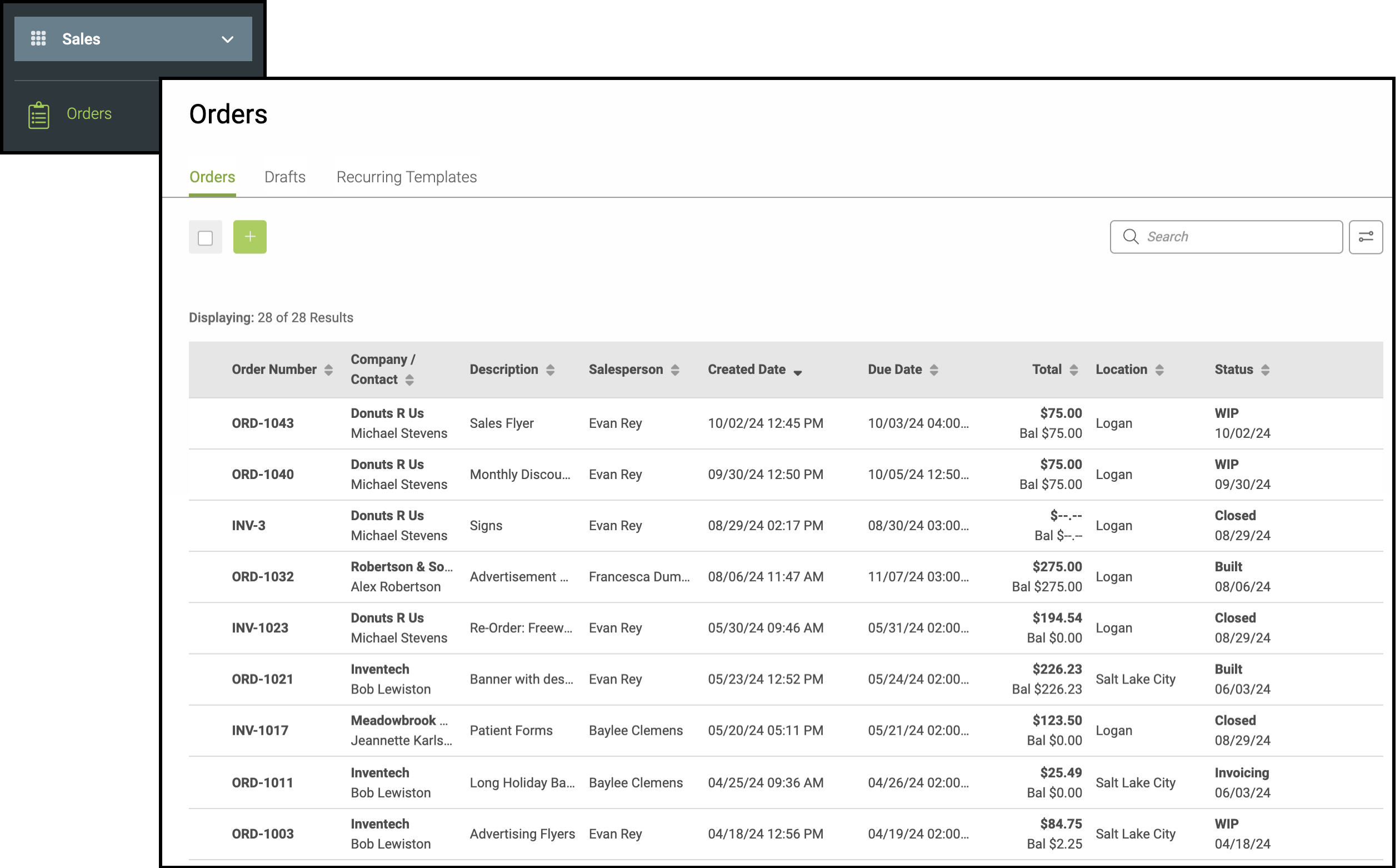
1. Select the invoiced or closed Order from the list.
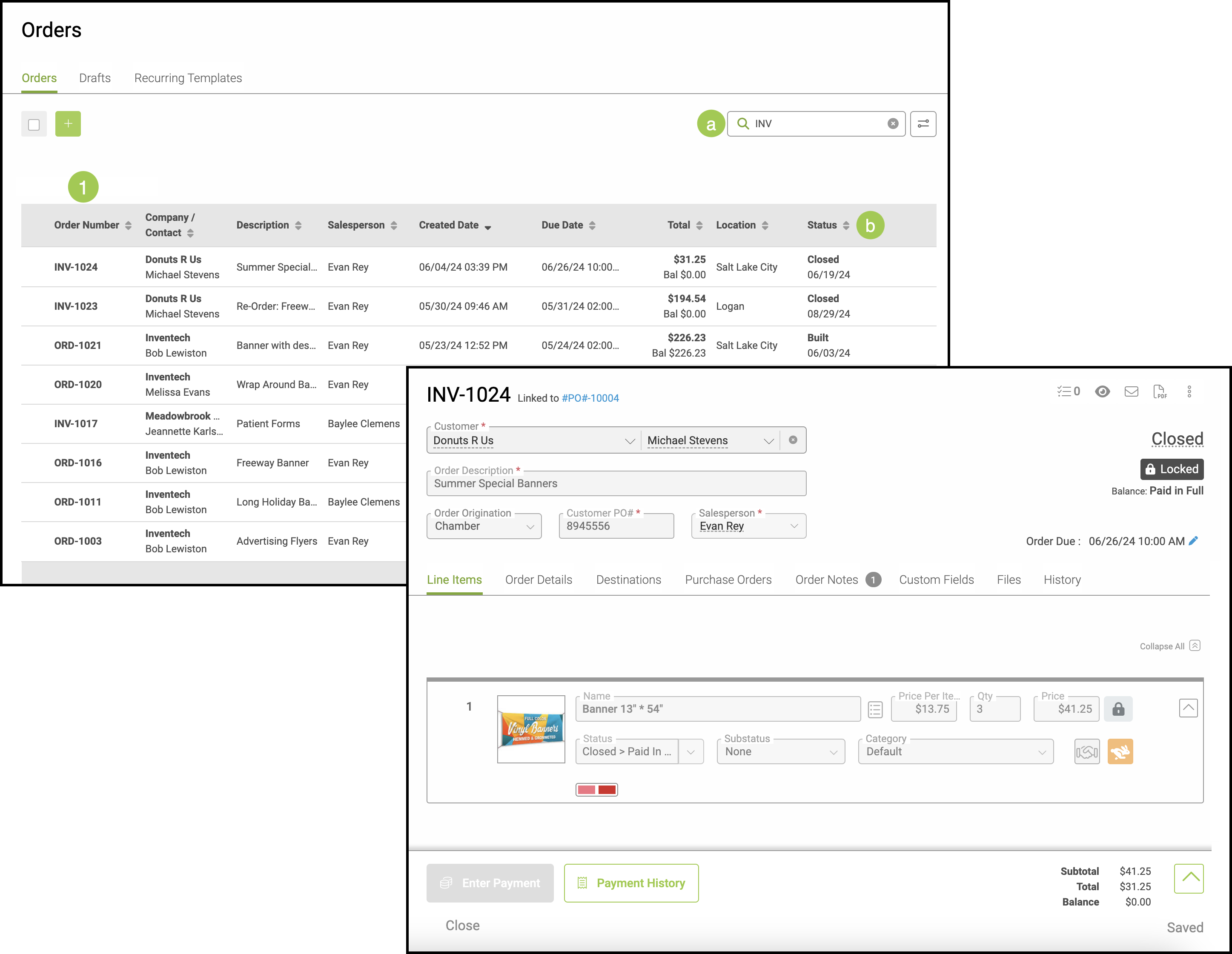
a. The search bar can be utilized to easily find the Order using the Order Number, Company / Contact, Description, Salesperson, Total, Location, or Status.
b. The status column on the right will display all Orders that are Invoiced or Closed.
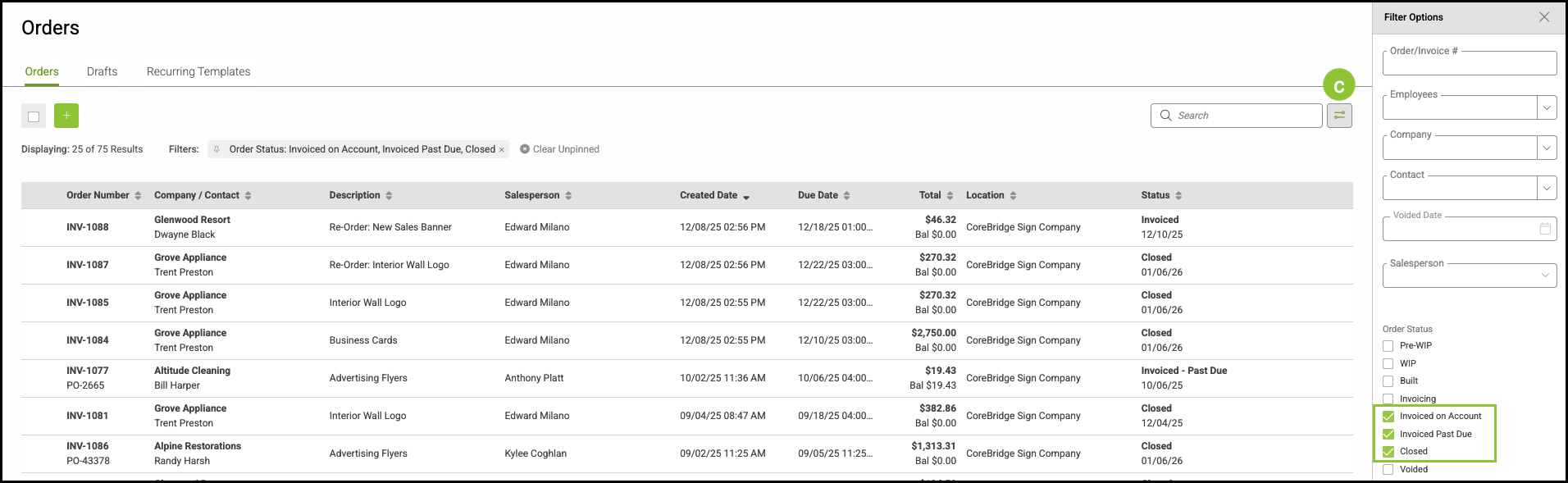
c. Utilize Filter Options to easily find all Invoiced or Closed Orders.
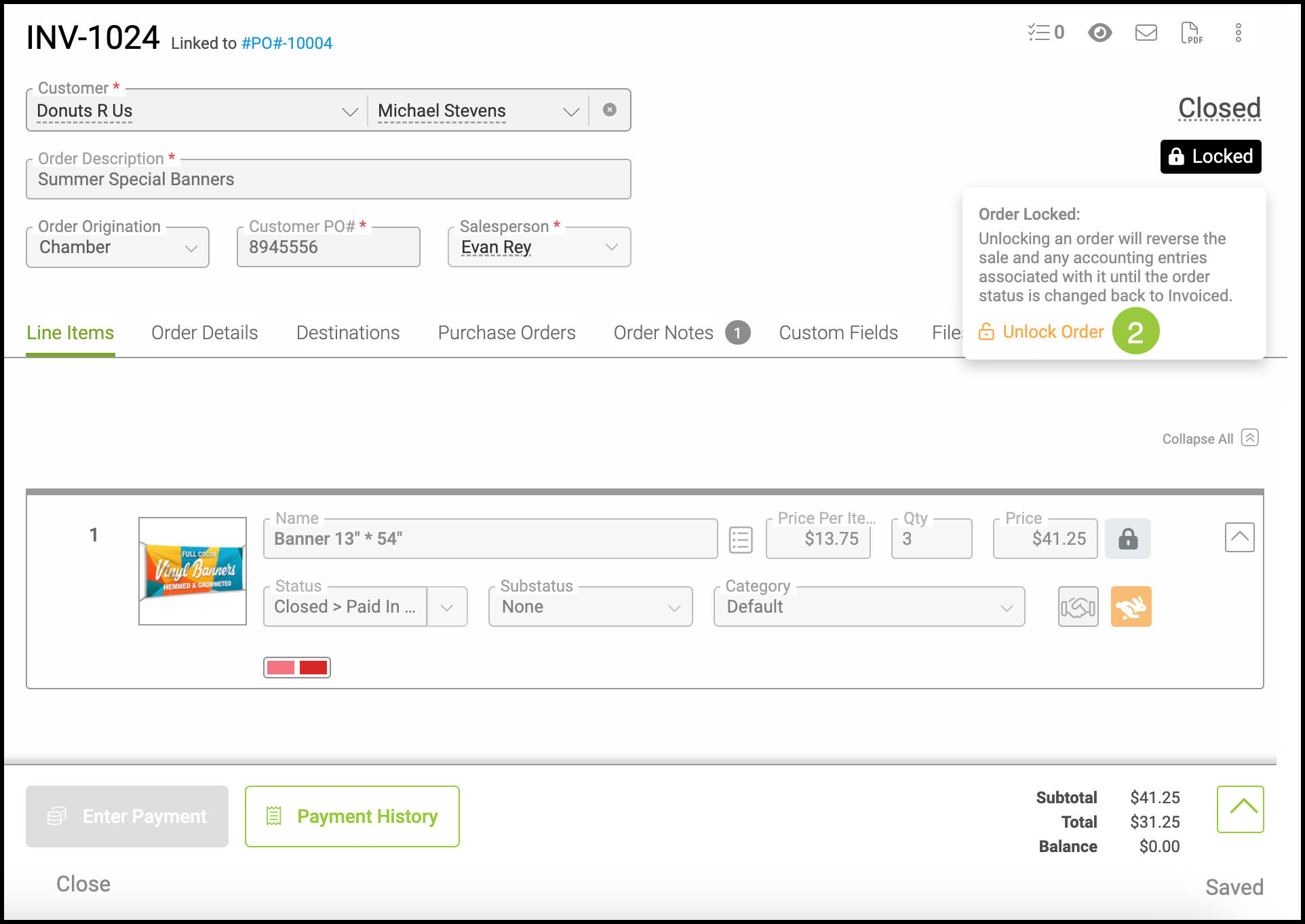
2. Hover over the Locked icon and select Unlock Order.
Note: This changes the status of the Order from Invoiced or Closed to Work in Progress and resets the invoiced and closed date milestones. See FAQ below for more information.
3. Make any needed edits.
Note: If a payment has been applied to the Order, the Customer cannot be changed.
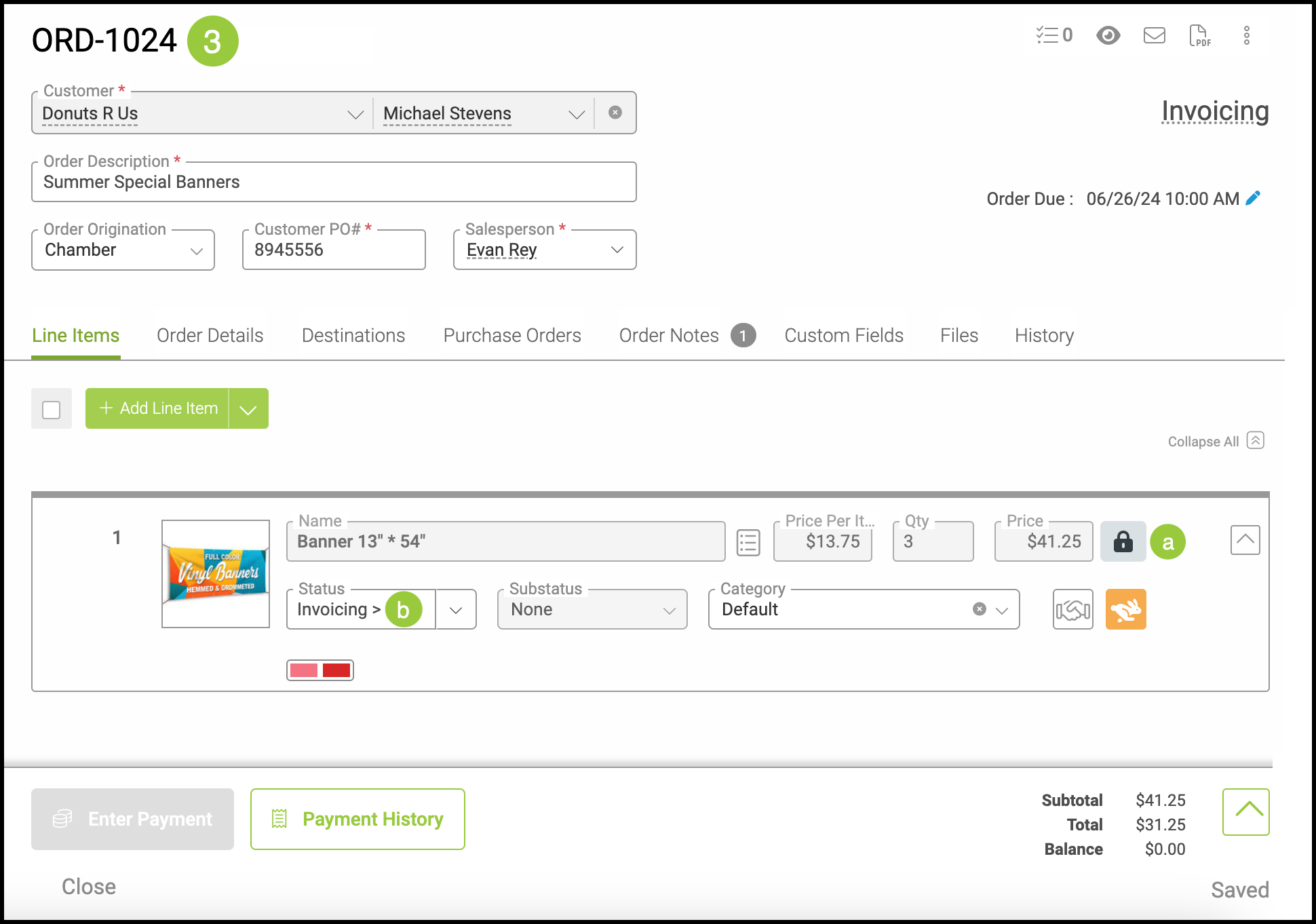
a. All of the line items will still be locked, even after unlocking the Order. To update line items, they will need to be unlocked by clicking the lock icon on the right hand side of the line item.
b. All line items will have their status automatically updated to "Invoicing." This can be adjusted at any time and will automatically update to "Invoiced" once the Order has been closed again.
Closing the Order
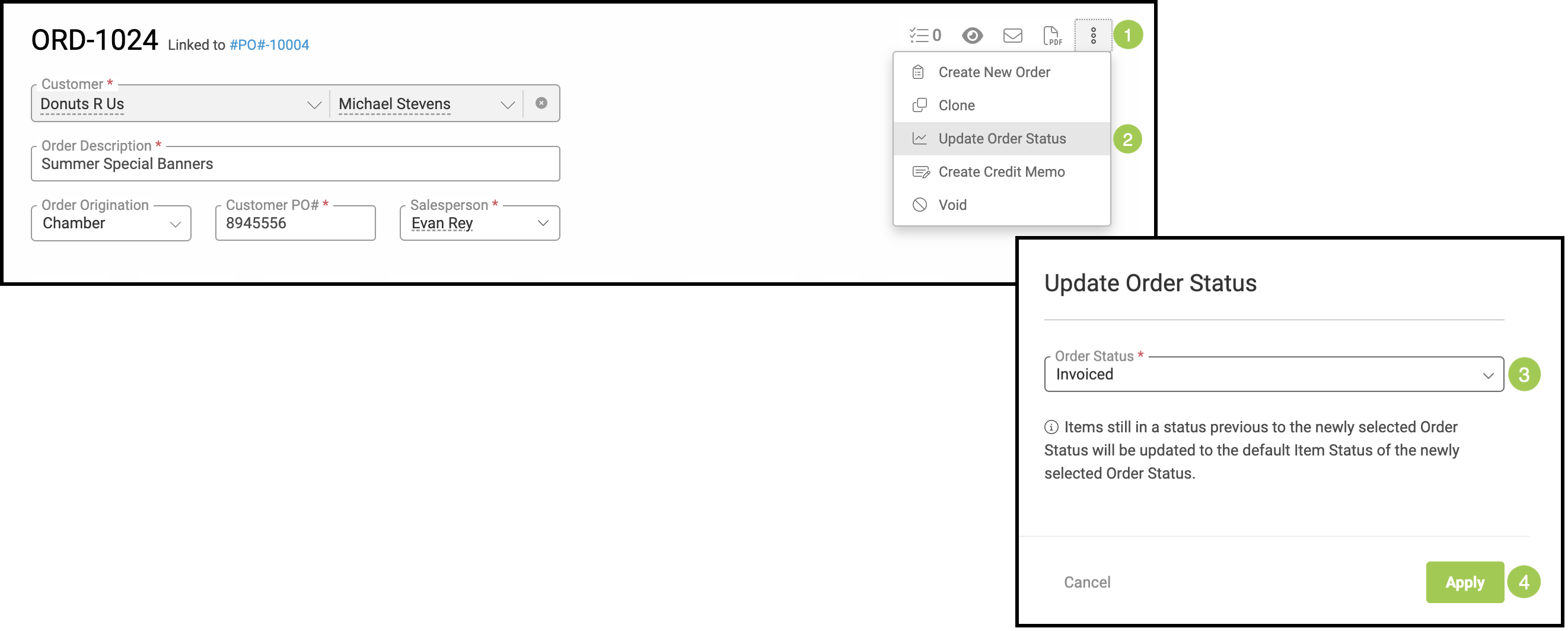
When you have finished editing, your Order can be reset to Invoiced or Closed by changing the Updating the Order Status.
Note: When an Order is marked as Invoiced and the full payment is received, the system automatically updates the Order status to Closed.
1. Click on the ellipsis in the upper right corner of the Order.
2. Select Update Order Status.
3. Use the dropdown menu to select Invoiced.
4. Click the green Apply button.
FAQ
1. Question: Does CoreBridge support backdating?
Answer: No, CoreBridge does not support backdating. All changes made to unlocked Orders will be documented as separate, new events.
2. Question: How does unlocking an order affect reports based off of milestones?
Answer: When an Order is unlocked, the Invoiced and Closed date milestones are erased. Due to this, all reports that are based off of the Invoiced or Closed date milestones will no longer show the Order.
The Order will still continue to show in reports that are based off of other milestones such as Created, Pre-WIP, WIP, Built, Invoicing, and Balance Due.
New milestones will be recorded at the time of the Order being Invoiced and Closed again. All reports that are based off of the Invoiced or Closed date milestones will then show the Order within the timeframe of the new milestones.
Note: We strongly recommend using reports based off of GL Entries for a better representation of financial information over time, as reports based off of milestones may show Orders in different time periods than expected due to the Order being unlocked. See Question 5 for more information on how unlocking an Order affects reports based off of GL Entries.
3. Question: Which reports are effected by unlocking a Closed Order?
Answer: The following reports are based off of milestones:
Pipeline Reports
- Orders Voided
Production Reports
- WIP by Order
- WIP by Order with Financial
- WIP by Order with Trends
- WIP by Line Item
- Material Purchases Needed
- Current POs
4. Question: How does unlocking an order affect the orders GL Entry history?
Answer: As the Order is unlocked, a new GL Entry will be created containing an opposite - or reversed - record of the debits and credits recorded to close the Order. This is known as a GL Entry Reversal and helps create a clear and full record of all changes and corrections. The Order can then be modified and all modifications will be recorded as normal.
The action will be recorded in the History tab as Order Updated - Status Changed, with the description as Closed - Invoicing.
Note: All GL Entries previous to unlocking the order will remain unaffected.
5. Question: How does unlocking an order affect reports based off of GL Entries?
Answer: Unlocking an Order will not change any previous GL Entry data. Instead, a new entry will be recorded that will account for the decrease in income and cost. This will create a net income and cost value of zero between the original record and the new record. As an Order is closed and unlocked, this process will repeat until the Order is closed for the final time. Once the Order has been closed for the final time, an entry will record the total increase in income and cost.
All reports based off of GL Entry data will reflect the net value of the order within the time frame being viewed.
6. Question: Which reports are based off of GL Entries?
Answer: The following reports are based off of GL data:
Financial Reports
- Revenue Reports
- Revenue by Customer
- Revenue by Income Account
- Revenue by Month
- Revenue by Salesperson
- Revenue by Year
- General Ledger Summary
- Revenue by Company Origination
- Revenue by Component Type
- Revenue by Company Industry
- Revenue by Line Item Category
- Revenue by Order Origination
- Tax Liabilities by Tax Group & Tax Item
- Tax Liabilities by Tax Item
Customer Reports
- Accounts Receivable Summary
- Accounts Receivable Detail by Company
- Accounts Receivable Details by Salesperson
7. Question: Why is there an entry in my Sales Details report(s) that shows zero income and cost?
Answer: When an Order is closed, the Sales Details report(s) will account for the increase in income and cost. If the same Order is later unlocked, the Sales Detail(s) report will account for the decrease in income and cost. If the increase and decrease both occur during the same time period you are viewing, only the net value of the income and cost will be displayed. Because of this, if an Order has the same amount of increase as it does decrease, it will show as zero income and cost on the report. This ensures that you are able to accurately view all Orders relevant to the time period, even if the net value at times may be zero.
8. Question: How does making financial adjustments to an unlocked order relate to the reconciliation process?
Answer: When an Order is invoiced, its total appears in reconciliation as Income and Accounts Receivable. If that Order is later unlocked, the system treats it as no longer invoiced. The amounts are removed from Income and Accounts Receivable and move back into the WIP section of the reconciliation. Any financial changes made while the Order is unlocked do not affect Income or Accounts Receivable until the Order is invoiced again.