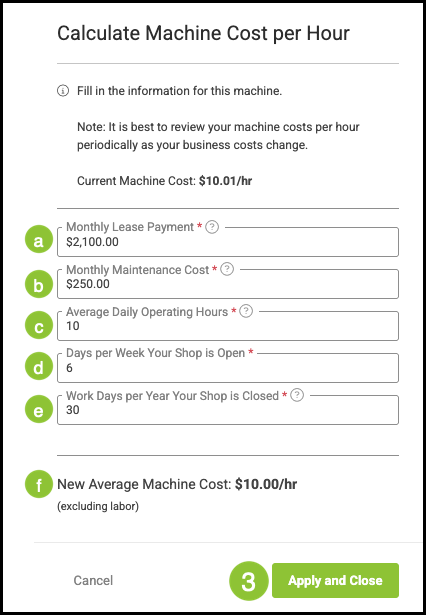
The Machine Cost Worksheet helps you determine the true cost per hour to run a machine by combining several operational and ownership expenses. Rather than focusing only on basic operating cost, the worksheet brings together factors such as lease or replacement value, maintenance, and actual usage patterns. By entering these details, the worksheet calculates an accurate hourly rate that supports more informed pricing decisions and ensures your machine-related costs are fully represented in your workflow.
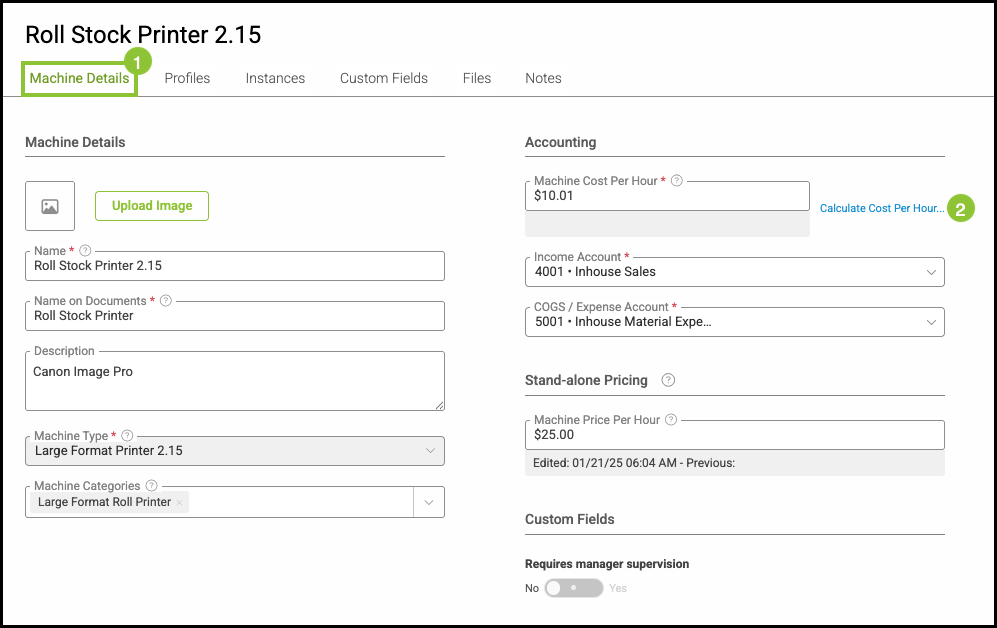
Navigate to Settings / Components / Machines and select the appropriate Machine.
1. Select the Machine Details tab.
2. Click the link Calculate Cost Per Hour.
a. Monthly Lease Payment - This is the monthly fee to operate and rent this machine.
Note: If you do not have a monthly payment, we recommend to estimate a monthly rental amount or a monthly replacement cost.
b. Monthly Maintenance Cost - This would be your estimated monthly maintenance contract, repairs, and parts to maintain this machine.
c. Average Daily Operating Hours - This would be an average of daily operating hours, not when the machine is available.
d. Days per Week Your Shop is Open - This is the number of days per week your shop is open.
e. Work Days per Year Shop is Closed - This is the number of days per year the shop is closed, such as holidays and Sundays.
f. Based on the information entered, the worksheet will calculate a Machine Cost per Hour for this machine and will update the field.
3. Click Apply and Close.