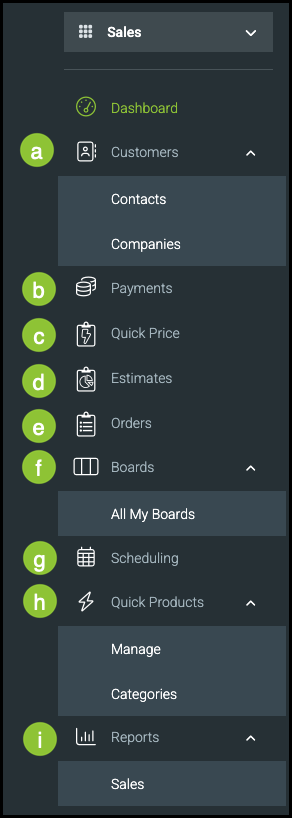
The Sales Module is the central hub for your sales team. It allows you to create and manage Customer records, generate Estimates and Orders, and record or receive Payments.
For more information on Modules, please see Modules Overview.
a. Customers - The Customers in your system represent both individuals and businesses. You can manage them as standalone Contacts or as Companies, giving you flexibility in how you organize your Customer base. For more information, please see Creating Contacts and Creating Companies.
b. Payments - Manage Customer Payments, including entering new Payments and reviewing past transactions. For more information, please see Payment Methods.
c. Quick Price - A tool to quickly calculate the Cost of Products and services without linking them to a Customer.
d. Estimates - Create or edit the initial project price and scope, which can later be converted into an Order. For more information, please see Estimates Overview.
e. Orders - Create or edit the official project cost and scope that the Customer has approved. For more information, please see Orders Overview
f. Boards - Boards help track the Status of Line Items, Orders, Estimates, and destination types. For more information, please see Boards Overview.
g. Scheduling - Display multiple Calendars in one view to coordinate team commitments, manage deadlines, and schedule meetings more efficiently. For more information on Scheduling, please see Scheduling Overview.
h. Quick Products - Quick Products are a time saving tool that allow you to build completed items that can later be added to Estimates or Orders. For more information on Quick Products, please see Quick Products Overview.
i. Reports - Run Reports specific to Sales. For more information, please see Reports Overview.