
Modules are distinct sections within the system that allow you to manage different aspects of your business, such as Sales, Production, Accounting, and more. Each Module is designed to organize related tools and workflows in one place, making it easier to complete tasks and access important information. Navigation to these areas is controlled by user permissions, so team members will only see the Modules they are authorized to use.
Table of Contents
Available Modules
Modules can be accessed from any screen.
a. This arrow expands or hides the Side Bar where the Module Menu is located.
b. This arrow opens the Module Menu dropdown.
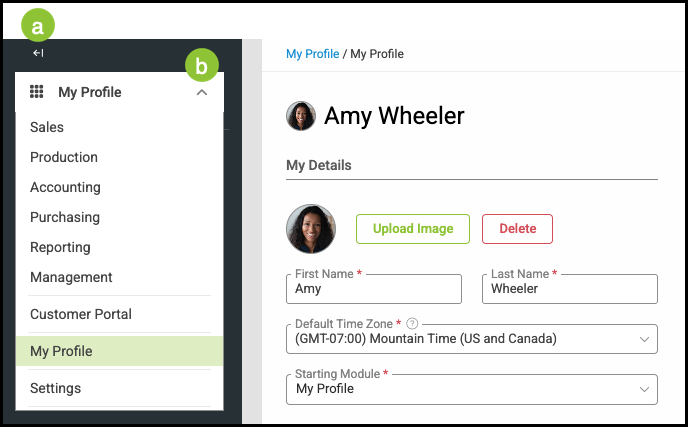
Sales Module - The Sales Module is the central hub for your sales team. It allows you to create and manage Customer records, generate Estimates and Orders, and record or receive Payments. For more information, please see Sales Module.
Production Module - The Production Module provides visibility into Product Statuses as they move through each stage on your workflow Boards, making it easy to track progress and update details in real time. For more information, please see Production Module.
Accounting Module - The Accounting Module is where you manage financial transactions, including Payments and Credit Memos. This Module supports Reconciliation, and offers a variety of financial reports to keep your books accurate and up to date. For more information, please see Accounting Module.
Purchasing Module - The Purchasing Module gives you tools to create and manage Purchase Orders, maintain Vendor information, and organize Catalogs. It ensures your purchasing process remains efficient and traceable. For more information, please see Purchasing Module.
Reporting Module - The Reporting Module provides access to real-time reports that are critical for monitoring business performance. These reports help you evaluate trends, measure results, and make informed decisions. For more information, please see Using New Reports.
Management Module - The Management Module contains the settings that govern how your business operates day-to-day, including employee access, team configurations, and product setup. For more information, please see Management Module.
Customer Portal - The Customer Portal is an online platform that gives your Customers 24/7 access to key information. From any device, Customers can review Proofs, approve Estimates, request quotes, pay Invoices, and more. The Customer Portal Module gives you a preview of what Customers will see when they sign in to their portal. For more information please see Customer Portal Module Overview and Customer Portal Module.
My Profile Module - The My Profile Module is designed for individual Employees to manage their personal information, such as contact details or account settings, that were entered when their user profile was created. For more information, please see My Profile Module.
Settings Module - The Settings Module is where administrators and owners configure system-wide features and defaults. This ensures the system is tailored to your company’s processes before it is put into daily use. For more information, please see Settings Module.
Dashboards
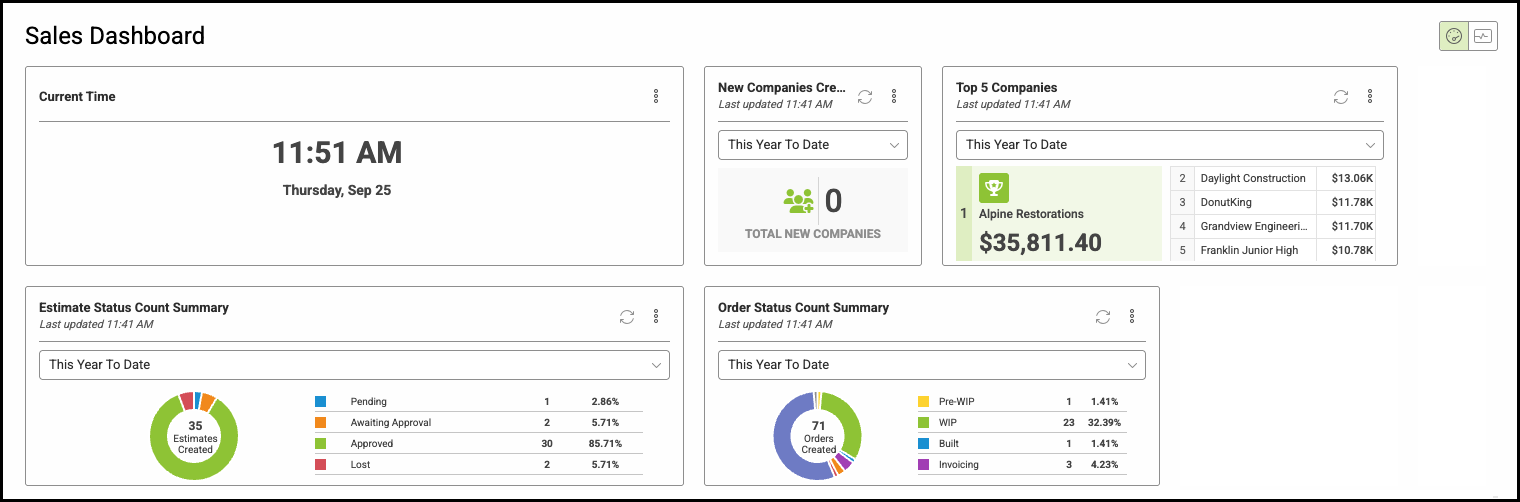
Dashboards are found in the Sales, Production, Accounting, Purchasing, and Management modules. You can add a variety of widgets to quickly review specific data as well as click, drag, and expand the widgets to customize the view. For more information on Dashboards and Widgets, please see How to Set Up Dashboards and Widgets and Widgets Overview.
Related Articles
Customer Portal Module Overview
Employee Roles and Permissions
Establishing Default GL Accounts
How to Set Up Dashboards and Widgets
Messages and Notifications Overview
Setting up Email From Addresses