The Customer Portal is an online platform that gives your Customers 24/7 access to key information. From any device, Customers can review Proofs, approve Estimates, request quotes, pay Invoices, and more. The Customer Portal Module gives you a preview of what Customers will see when they sign in to their portal.
For more information on Modules, please see Modules Overview.
For more information on this Module, please see Customer Portal Module Overview.
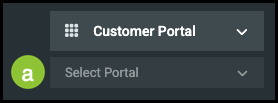
a. Select Portal - This dropdown allows you to choose the Company whose perspective you would like to see.
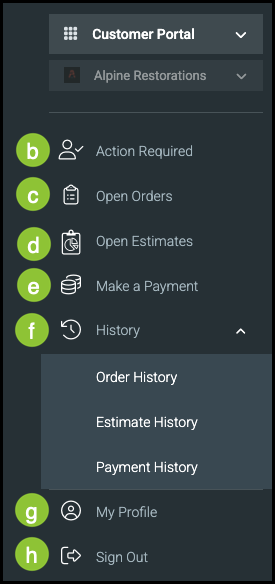
b. Action Required - These are items that need an action completed to progress the order through the workflow.
c. Open Orders - In this section, your Customers can view any Orders that are currently being worked on.
d. Open Estimates - This section allows your Customers to view all Estimates that are currently being worked on.
Note: Completed Estimates will move to the Open Orders section.
e. Make a Payment - This section allows the Customer to see which Orders need to be paid.
f. History - Clicking on the History section gives your Customer the option of selecting one of three subsections including Order History, Estimate History, and Payment History. Selecting anything from the list will bring up more detailed information.
Note: This section and related subsections are optional and must be enabled in order to show in the Customer Portal.
g. My Profile - This section is for your Customers to fill out. They can choose to provide as much or as little information as they would like.
h. Sign Out - Clicking Sign Out will immediately sign your Customer out of their Customer Portal.
Note: If you click on this, it will sign you out of your system as well.