
The Full Unlock feature lets you unlock Orders that are already Invoiced or Closed by creating a new, editable version of the Order while preserving financial accuracy and historical records.
Full Unlock is designed for scenarios where changes are needed after an Order has reached a locked state.
Table of Contents
- Important Information
- Before You Begin
- Using Full Unlock
- After Full Unlock
- Payments and Full Unlock
- Invoice Numbers and Customer Communication
- Change History
- Related Articles
Important Information
- Full Unlock applies to Orders with a Status of Invoiced or Closed.
- The original Order remains intact for historical and financial reporting purposes.
- A new unlocked version of the Order is created for editing.
- Financial entries from the original Order are automatically reversed, and a Credit Memo is created.
- Payments, if present, are carried forward to the new Order.
- Relevant historical dates and timestamps from the original Order are preserved on the new Order.
- Approved Estimates can show as locked and cannot be edited. Full Unlock is available for Orders only.
Before You Begin
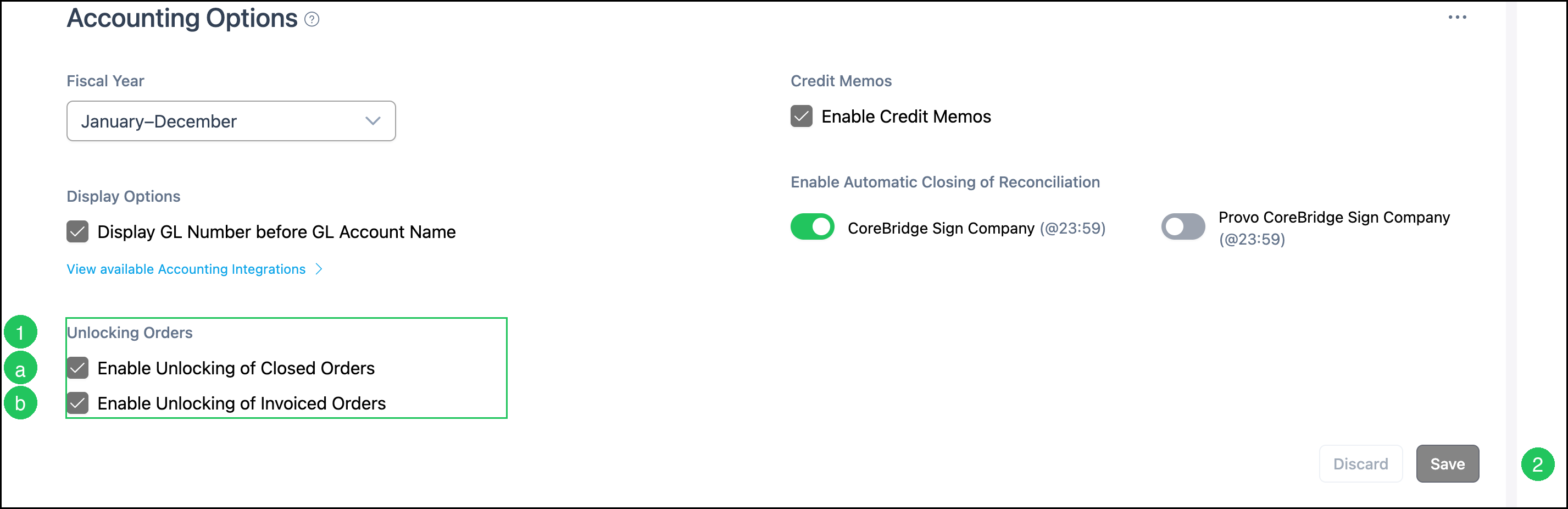
Full Unlock must be enabled in Accounting Options, and your role must include the Can Unlock Orders permission.
Navigate to Settings / Accounting / Accounting Options.
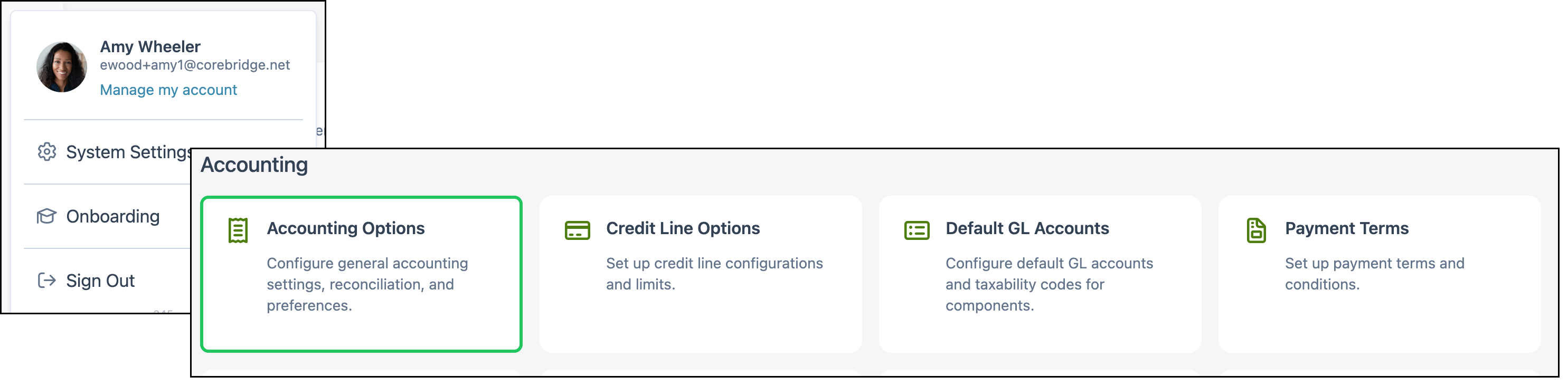
1. In the Unlocking Orders section, select the options that apply:
a. Enable Unlocking of Closed Orders - Allows Closed Orders to be unlocked.
b. Enable Unlocking of Invoiced Orders - Allows Invoiced Orders to be unlocked.
Note: Enabling these options should be done with caution, as unlocking and editing Closed or Invoiced Orders can affect reconciliation and reports.
2. Click Save.
Note: For more information on these settings, see Accounting Options.
Using Full Unlock
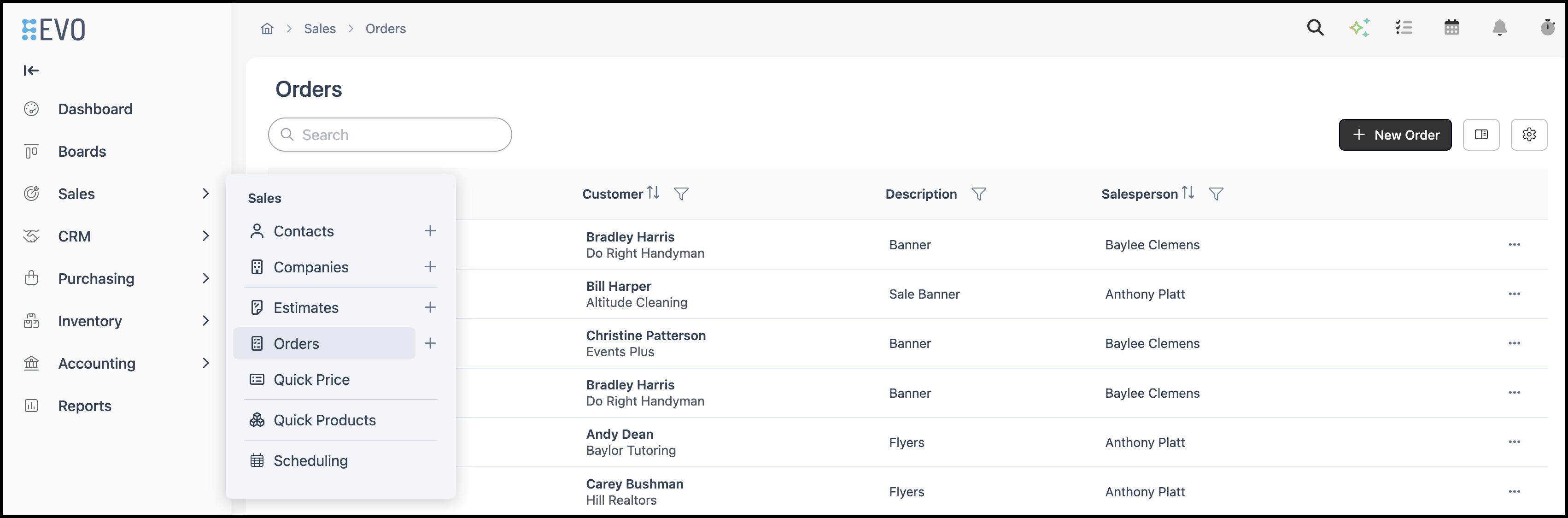
Navigate to Sales / Orders and open the Invoiced or Closed Order.
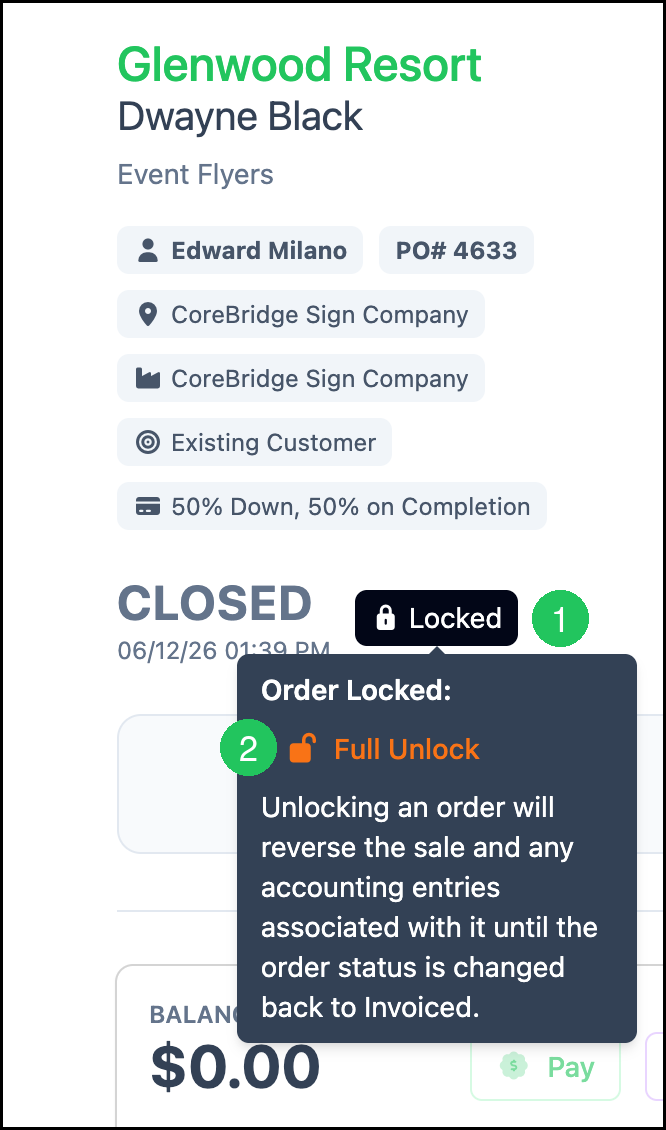
1. Hover over the Locked badge.
2. Click Full Unlock.
Note: Unlocking reverses the sale and related accounting entries until the Order status is changed back to Invoiced.
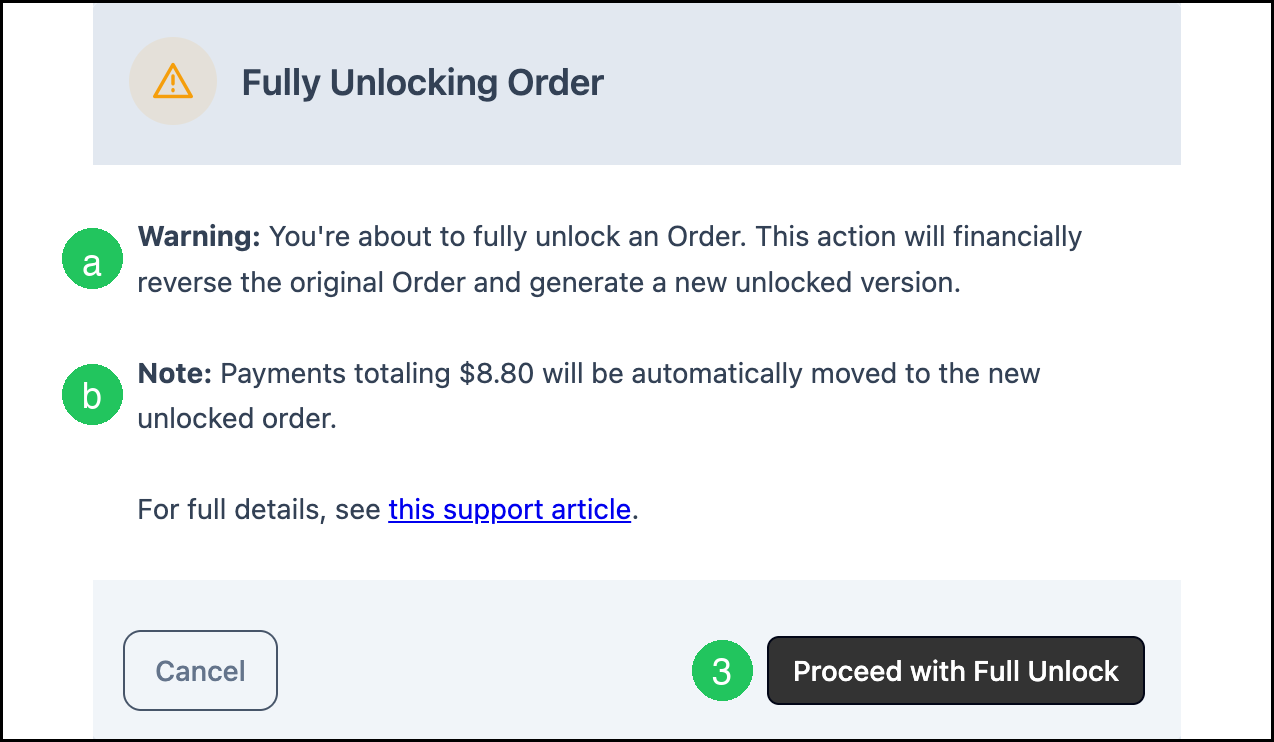
The Fully Unlocking Order dialog opens.
a. Warning - Explains that Full Unlock financially reverses the original Order and generates a new unlocked version.
b. Note - If payments exist, shows the payment total that will be moved to the new Order.
3. Click Proceed with Full Unlock.
You are redirected to the newly created unlocked Order.
After Full Unlock
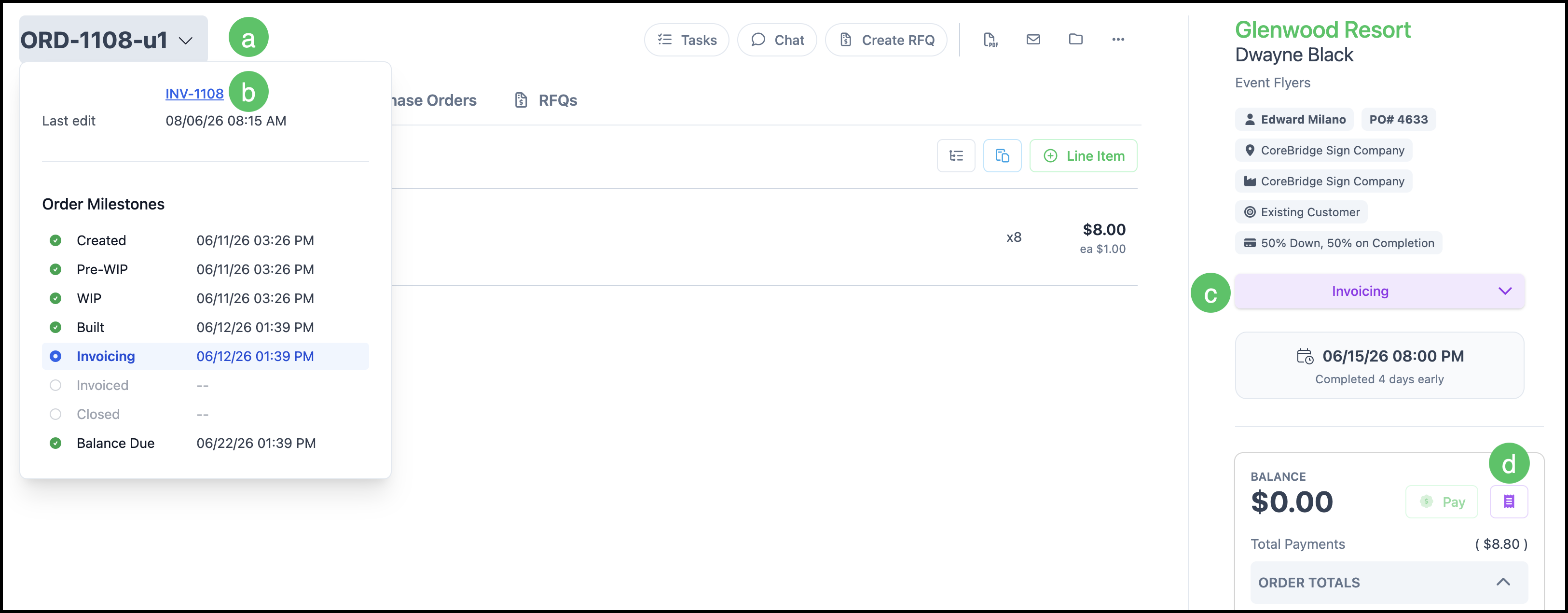
A new Order is created from the original Order.
a. The Order number remains consistent, with a u1 suffix added when the Order is reopened.
Note: If an Order is unlocked multiple times, the suffix number increases with each unlock. For example, u2 represents the second iteration and u3 represents the third.
b. A link to the original Order is available on the new Order.
c. The Status returns to an editable workflow stage, typically Invoicing, or the next available Built status if Invoicing is not used.
d. The Payment History button is available to view payments on this Order.
Note: On a reopened Order, Totals and Payments are carried forward, and the Balance remains zero.
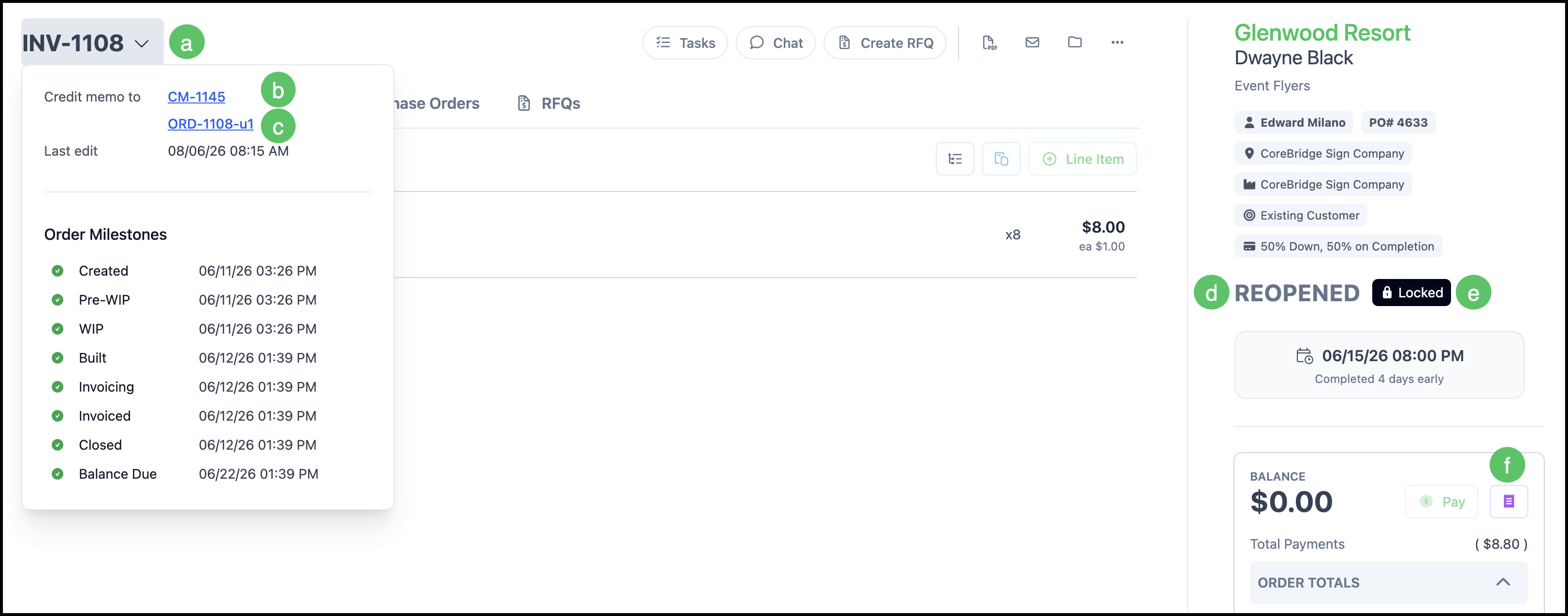
The original Order remains in your system.
a. The original Order number is retained.
b. A Credit Memo is created to reverse the original Order's financial entries. A link to the Credit Memo is available on the original Order.
c. A link to the new unlocked Order is available on the original Order.
d. The Status on the original Order updates to Reopened.
e. The original Order remains permanently Locked and cannot be unlocked again.
f. The Payment History button is available to view payments on this Order.
Note: On a reopened Order, Totals and Payments are carried forward, and the Balance remains zero.
Payments and Full Unlock
- If payments exist, the payment amounts are automatically moved to the new Order. The confirmation dialog shows the total that will transfer.
- If no payments exist, the new Order is created without payment records.
- Payment totals remain accurate whether the original Order was fully or partially paid.
Invoice Numbers and Customer Communication
- The original invoice number is preserved.
- Version identifiers are hidden from customer-facing invoices.
- Customers continue to see the expected invoice number without suffixes.
Change History
The Change History on both the original Order and the new Order reflects when the Order was unlocked. The new Order continues to record later changes, while the original Order does not.
For more information, see Order and Estimate Change History.