
Documents are used to relay information regarding various transactions such as Estimates, Orders, and Invoices. These are based on preset Document Templates in your system.
Documents in your system are all based on pre-created Templates that are organized by Document types.
Table of Contents
Accessing Documents
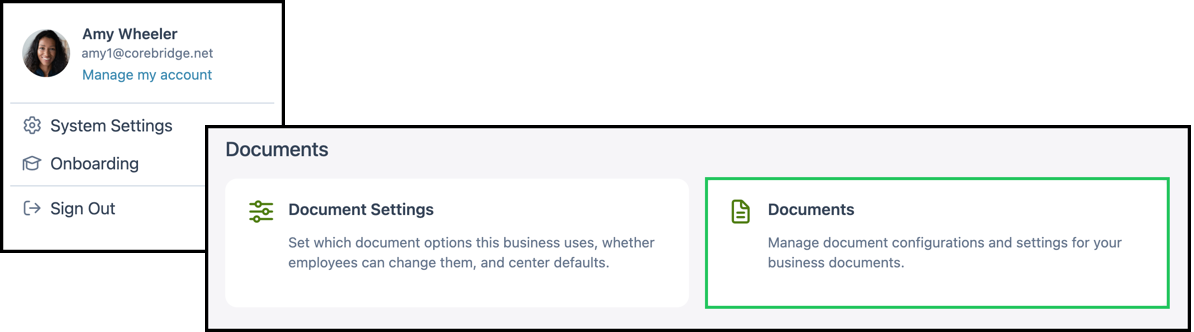
Navigate to System Settings / Documents.
Available Documents
The following describes the document types in the system and the templates typically available for each type. Your administrator selects the template when configuring a document in Settings. For more information, see Document Options.
Estimates
a. Standard Estimate - This Estimate displays estimate and line item data, with an option to show assembly details in a hierarchy.
Invoices
a. Standard Invoice - This Invoice displays order and line item data, with an option to show assembly details in a hierarchy.
Work Orders
a. Simple Work Order - This Work Order displays order details, with an option to show assembly details.
b. Standard Work Order with Condensed Header - This Work Order displays each line item with basic order details in a hierarchy. Includes options to show assembly details and bill of materials, with a page break between items and a condensed order summary header.
c. Standard Work Order with Standard Header - This Work Order displays each line item with basic order details in a hierarchy. Includes options to show assembly details and bill of materials, with a page break between items and a standard order summary header.
Packing Slips
a. Standard Packing Slip - This Packing Slip displays destination details, including shipping or installation information.
Receipts
a. Standard Receipt - This Receipt displays payment information for an order, with an option to select paper size.
Statements
a. Standard Statement - This Statement displays invoices with pending payments, with an option to include production orders.
Requests for Quotes
a. Standard Request for Quote - This Request for Quote displays request for quote details for outside vendors.
Purchase Orders
a. Standard Purchase Order - This Purchase Order displays purchasing details for outside vendors.
Credit Memos
a. Standard Credit Memo - This Credit Memo displays credit details related to invoices.
Reconciliations
a. Standard Reconciliation - This Reconciliation displays financial data, with an option to include payments and voided orders.
Deposit Slips
a. Standard Deposit Slip - This Deposit Slip displays cash and checks grouped into a compact bank-style deposit slip with deposit account and location details.
Royalties
a. Standard Royalty - This Royalty displays royalty breakdown by group, plan, and tier with optional customer exemptions footer.
Commissions
a. Standard Commission - This Commission displays commission breakdown by employee, plan, and income account with optional invoice detail.
Note: Template availability can vary by region, language, and what is enabled for your business. If you do not see a template when configuring a document, contact CoreBridge support for assistance.