
Vendor tax information in CoreBridge EVO is the EIN, FEIN, or Social Security number on the vendor's W-9. That form is stored as a Vendor Compliance Document, and 1099 amounts are prepared from Purchase Order history together with your accounting software.
Table of Contents
- Important Information
- Where the Vendor Tax ID Is Stored
- Storing W-9 and Tax Forms
- Add the Document on the Vendor Record
- Tracking Vendor Payments
- 1099 Reporting
- Related Articles
Important Information
- The Tax ID on a Customer company record is the number used for sales tax on Estimates and Orders. It is separate from a vendor's federal tax form.
- The vendor tax ID is the EIN, FEIN, or Social Security number on the vendor's W-9. That number stays on the uploaded Vendor Compliance Document.
- The Purchase Orders section on the vendor record lists each Purchase Order Total and Status. Use that history, with your accounting software, when you prepare 1099 amounts. Reports also includes Purchase Orders Detail.
- When a required document is missing or expired, the vendor shows a banner that required documents are missing or expired. Purchase Order stays unavailable until the document is current.
Where the Vendor Tax ID Is Stored
The vendor tax ID is the EIN, FEIN, or Social Security number on the vendor's W-9. That number stays on the uploaded form. Store that form with the steps in Storing W-9 and Tax Forms, then select it for the vendor in Add the Document on the Vendor Record.
Storing W-9 and Tax Forms
Vendor Compliance Documents is where you define the tax forms and other documents vendors keep on file.
Navigate to System Settings / Purchasing Settings / Vendor Compliance Documents.

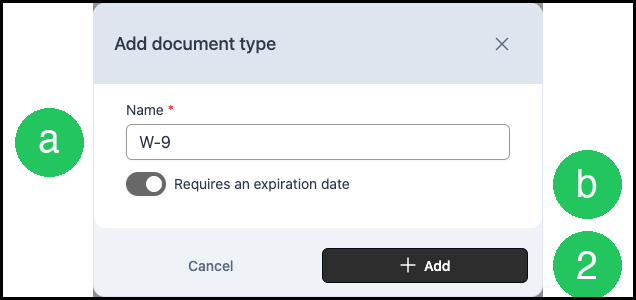
1. Click Add New Document. The Add document type dialog opens.

a. Name - The name of the document type, such as W-9.
b. Requires an expiration date - When on, an expiration date is required when the vendor uploads the document.
2. Click Add.
The document type appears in the list.
3. On the W-9 row, click More options.

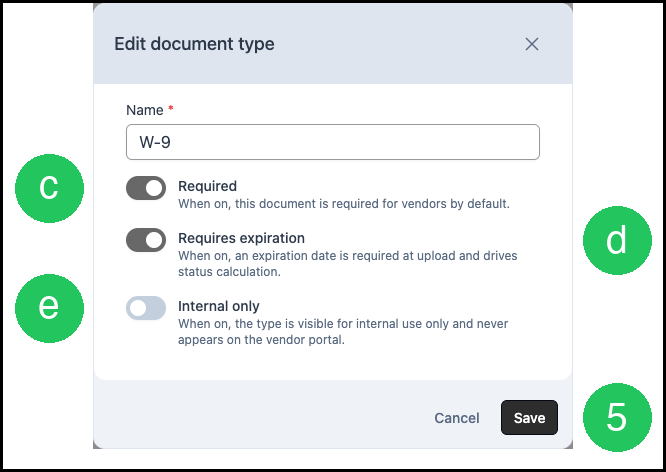
4. Select Edit. The Edit document type dialog opens.

c. Required - When on, this document is required for vendors by default.
d. Requires expiration - When on, an expiration date is required when the document is uploaded, and that date sets the document status.
e. Internal only - When on, the document type stays internal and does not appear on the Vendor Portal. Leave Internal only off so the vendor can see and upload the form.
5. Click Save.
Add the Document on the Vendor Record
Choose the compliance documents this vendor must keep on file. For more information on Vendor Records, please see Managing Vendors.
Navigate to Purchasing / Vendors.
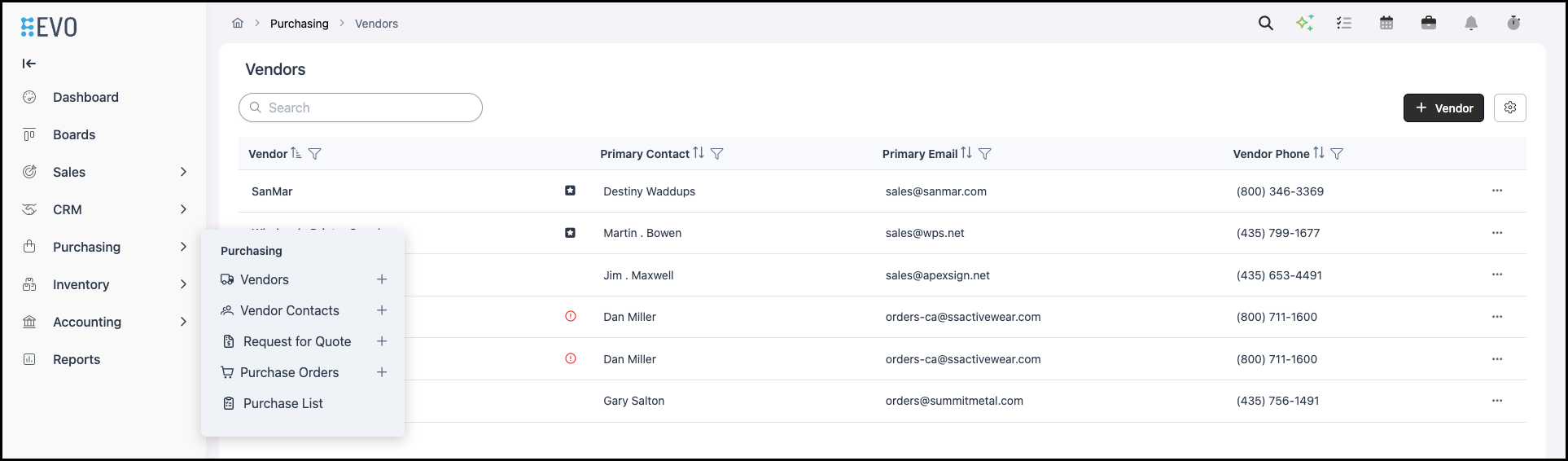
1. Select the Vendor. The vendor record opens.

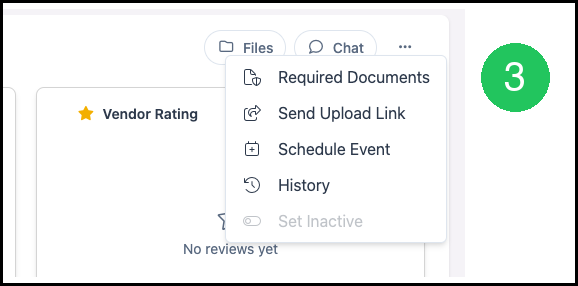
2. Click More Actions.

3. Select Required Documents. The Required Documents dialog opens.
The dialog lists one row for each document type. Find the document in the Type column.
a. On the W-9 row, turn on Required. Required selects W-9 for this vendor. To select another document, turn on Required on that row. For example, turn on Required for Certificate of Insurance when this vendor must provide that document.
4. Click Save.
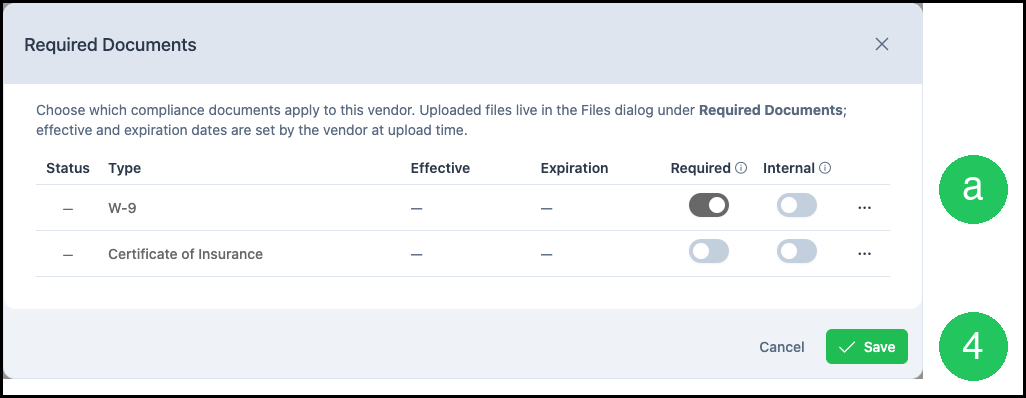
Save stores the documents selected for this vendor.
Note: Required selects the document. The W-9 file is uploaded in the Files dialog, under Required Documents. The vendor enters the effective date and the expiration date when the file is uploaded. To have the vendor upload the file, click More Actions and select Send Upload Link.
Tracking Vendor Payments
Vendor spending in CoreBridge EVO is tracked through Purchase Orders. On the vendor record, the Purchase Orders section lists each Purchase Order with its Total and Status. Balance shows the pending and open amounts. Reports also includes Purchase Orders Detail.
When your shop records vendor payments in an external accounting system, QuickBooks Online Detail Sync or Xero Detail Sync can include vendors and Purchase Orders when vendor sync is turned on. Use that activity in the accounting software for year-end tax work.
1099 Reporting
CoreBridge EVO keeps the vendor tax form on the compliance document and the order amounts on Purchase Orders. The 1099 form itself is prepared in your accounting software or with your tax preparer.